Run Detail
The Run Detail page is the central hub for a single workflow run. Navigate here by clicking a run name from the Runs List, or via the Tracker link printed by the tracker CLI after submission.
Information Cards
The top of the page shows two cards side by side.
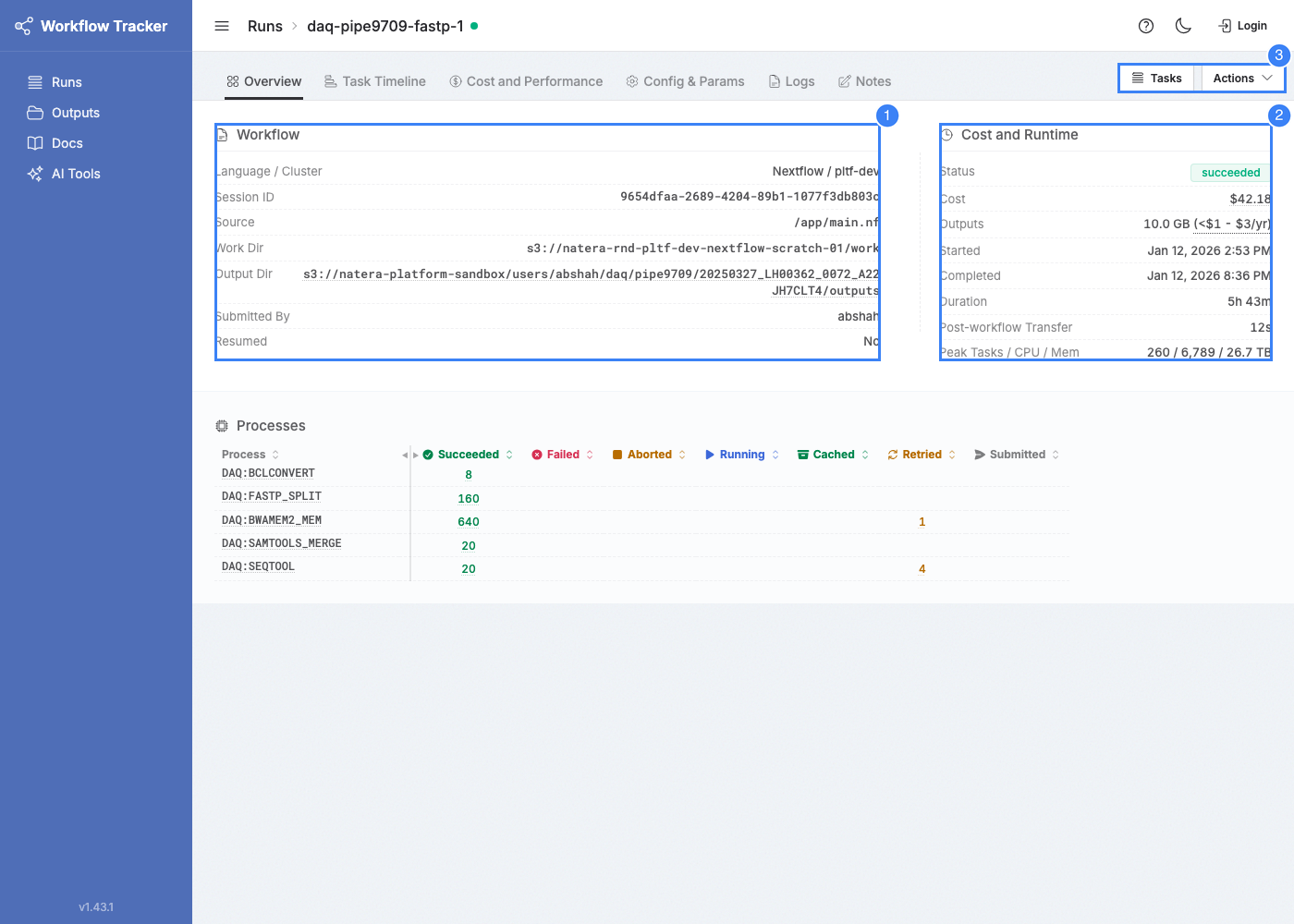
Workflow Info
- Repository -- Source repository URL (links to the repo)
- Revision -- Branch or tag (links to the revision)
- Commit -- Git commit hash (links to the commit)
- Work Dir -- Workflow runner's work directory path (S3)
Cost and Runtime
- Status -- Current status with colored indicator
- Cost -- Total estimated compute cost (succeeded, non-resumed runs). Links to the Cost & Performance tab.
- Outputs -- Total size of published outputs plus an annual S3 storage cost range. Hover the range for the per-tier breakdown (Frequent / Infrequent / Archive Instant). Shown after the run reaches a terminal status; appears as
Deletedonce outputs are removed. - Started / Completed -- Execution time window
- Duration -- Total elapsed wallclock time
- Peak Concurrency -- Maximum simultaneous tasks
Quick-nav and run actions appear above the cards: a Tasks button for the task list, and an Actions menu (see below) for run-level operations.
Actions
The Actions menu on the run detail page exposes destructive operations available to the run's owner and cluster admins:
- Delete output dir -- Permanently deletes the run's S3 output directory. A confirmation dialog requires typing
delete. Tracker keeps the index of paths so you can still see what was published, and the page records who deleted the outputs and when. See Outputs - Deleting Outputs.
Status Indicators
Beyond the standard statuses, runs can show:
- Disconnected -- Heartbeat is stale. The status dot changes color and a warning banner appears. The workflow runner may have crashed or lost connectivity.
- Stalled -- All tasks have reached terminal states but the workflow has not completed. The runner is likely hanging.
Tabs
The default tab is Overview, except for failed runs which open on Error & Resume. Some tabs are conditional.
Always-Present Tabs
| Tab | Description |
|---|---|
| Overview | Workflow info, cost and runtime, and the process summary. |
| Task Timeline | Gantt-style task execution visualization. See Task Timeline. |
| Config & Params | Resolved configuration, parameters, and command line. With the repo/commit info, provides everything to reproduce a run. |
| Notes | Freeform text annotations. For documenting observations or decisions about a run. |
| Logs | Workflow runner log from S3. See Logs. |
Conditional Tabs
| Tab | Appears When | Description |
|---|---|---|
| Error & Resume | Run failed | Inline resume command and the full error report. See Error & Resume below. |
| Cost and Performance | Succeeded, non-resumed run | Cost estimates and performance breakdown. See Cost & Performance. |
| Reports | tracker.yml reports resolved |
Workflow-defined report files. See Reports. |
| AI Analysis | Auto-analysis job submitted | AI-generated analysis. See AI Analysis. |
| Run History | Run has resume history | Prior execution cycles. See Resume History. |
Error & Resume
When a run fails, Tracker auto-selects this tab. It contains two things:
- Resume command -- A copy-paste-ready snippet (
-resume <session_id> -name <run_name>) you can append to your nexttracker runinvocation to reuse the prior run's cached tasks. Editing code or parameters between attempts is fine, but those edits invalidate the cache for affected tasks. - Error report -- The captured error output from the workflow runner, identifying which process or task triggered the failure.
If AI Analysis is available, a callout near the top of this tab links to it. The AI analysis usually identifies the root cause faster than reading the raw error report.
Process Table
The default tab shows all processes with task count columns.
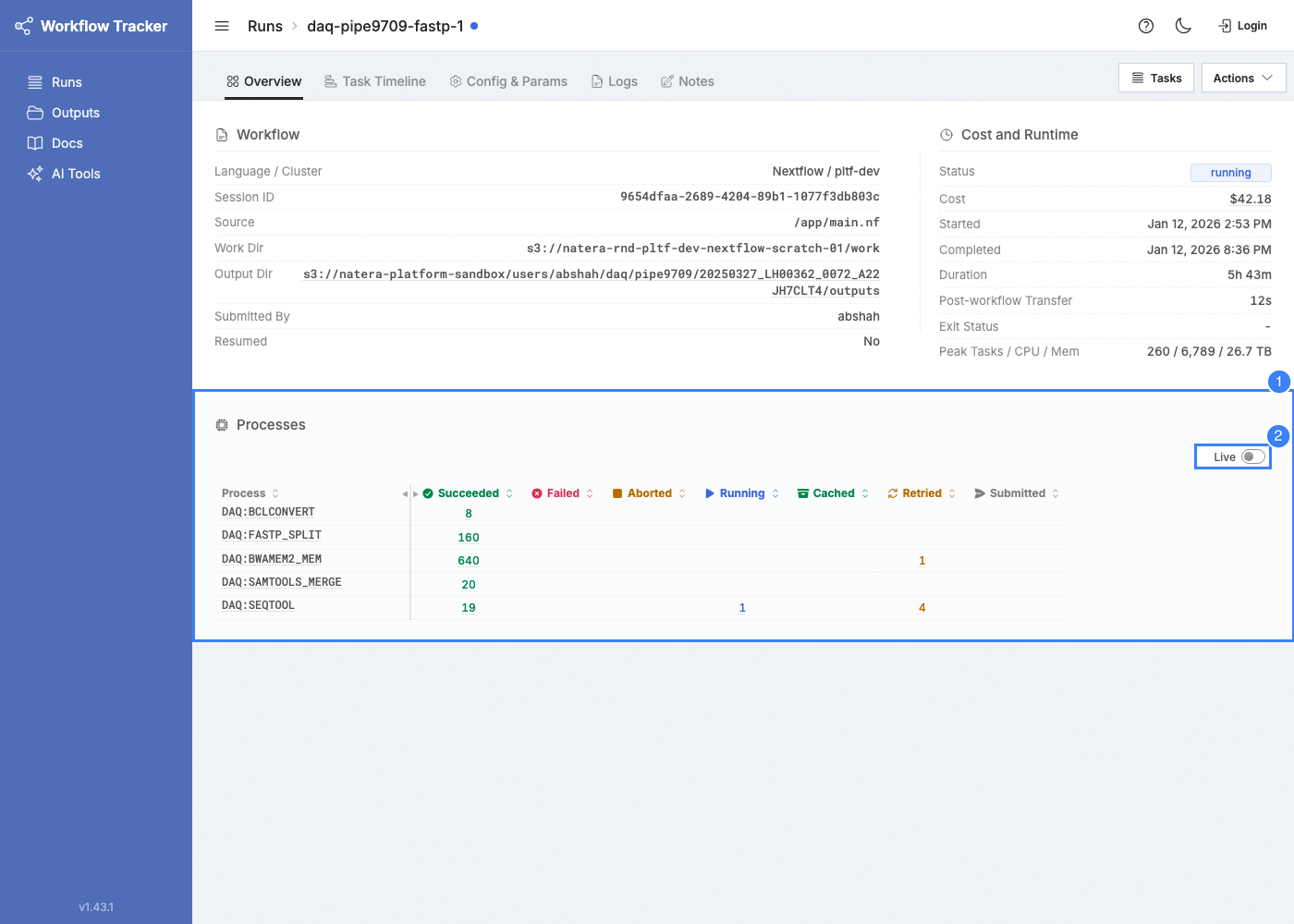
Columns
| Column | Description |
|---|---|
| Process | Process name (last two colon-separated segments). Links to Process Detail. |
| Succeeded / Failed / Aborted / Running | Task counts by status |
| Cached | Tasks satisfied from cache (not re-executed) |
| Retried | Tasks with more than one attempt |
| Submitted | Tasks submitted but not yet started |
Columns are sortable.