Task Detail
Complete information about a single task execution: status, resource consumption, execution environment, and links to external tools. Navigate here by clicking a task row in the Process Detail task table, or a task name in the Task Timeline.
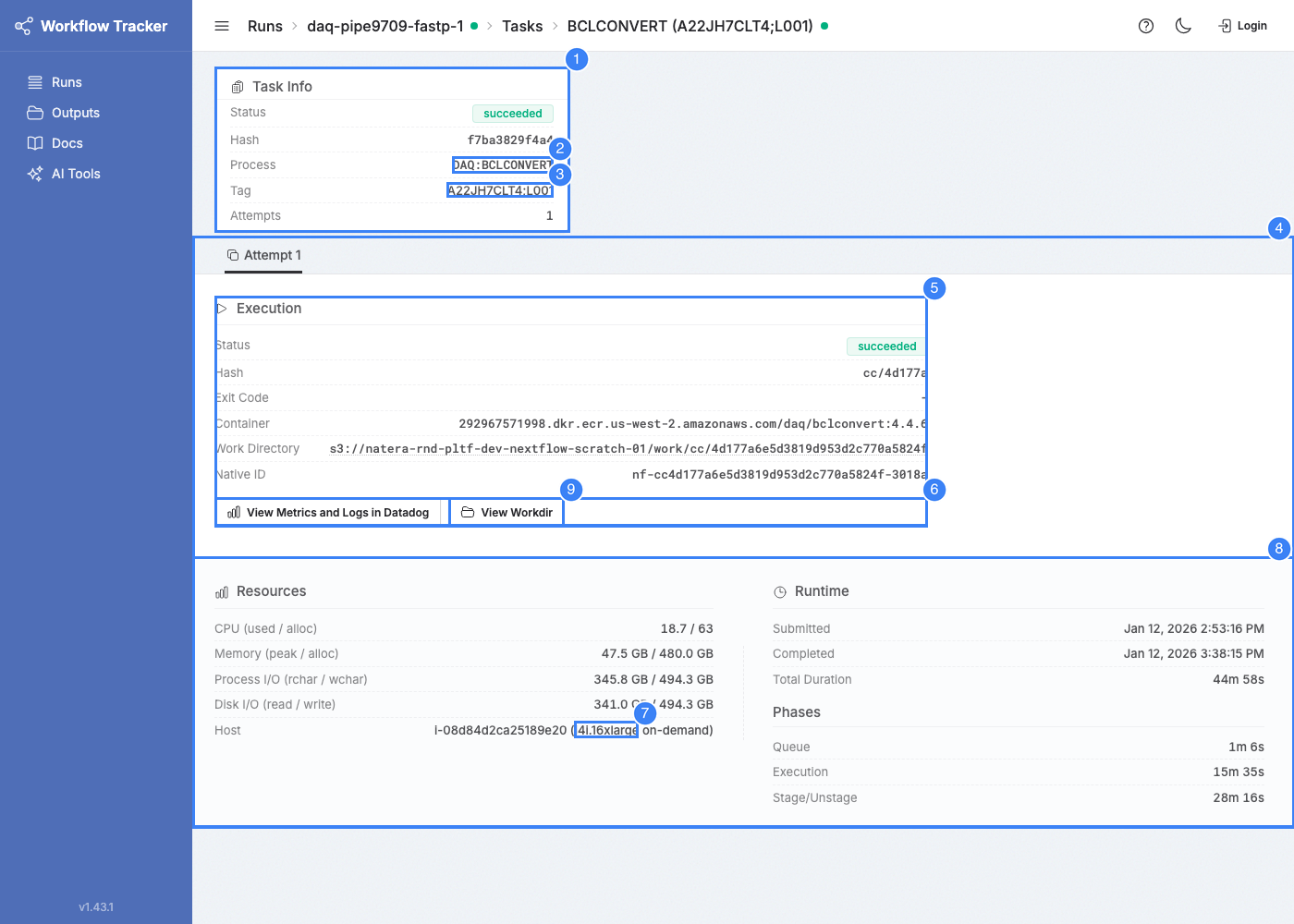
Task Information
- Process -- Links to the process detail page.
- Tag -- Task tag, as defined in the workflow's process code. Links to a cross-process view of all tasks with the same tag in this run.
- Attempts -- How many times this task was executed. More than one means retries occurred.
Attempt Tabs
If a task was retried, each attempt appears as a separate tab, latest first. Compare attempts to understand what changed -- exit codes, resource usage, timing, and instance details.
Per-Attempt Details
Status and Exit Information
- Status -- succeeded, failed, or aborted
- Exit Code -- 0 for success, non-zero for errors
- Failure Reason -- Cause of failure when known. Includes Kubernetes-reported reasons (e.g.,
OOMKilled,Evicted,DeadlineExceeded) and Tracker-attributed infra failures:SpotEviction-- The spot instance running this task was reclaimed by EC2. The attempt is also marked Spot Interrupted. Tracker correlates spot termination notices to recently-failed attempts on the same host, so this label can apply retroactively to attempts that originally reported a generic K8s reason.- Other infra failures Tracker may surface include disk exhaustion, image-pull errors, and pod evictions due to node pressure.
Timing
- Submitted / Started / Completed -- Timestamps
- Queue Duration -- Waiting for a node (submitted to started)
- Execution Duration -- Task command wallclock time
- Overhead Duration -- File staging and unstaging time (total minus execution minus queue)
Resources
- CPU % -- Actual utilization vs. allocated CPUs
- Peak RSS -- Peak memory vs. allocated memory
- I/O --
rchar/wchar(logical),read_bytes/write_bytes(physical)
Execution Environment
- Container -- Container image used
- Workdir -- S3 path to the task's work directory
- Native ID -- Kubernetes job name
Instance Information
- Hostname -- The K8s node (EC2 instance) where the task ran
- Instance Type -- EC2 instance type. Click to see vCPU/memory details and spot/on-demand pricing.
- Capacity Type -- Spot or on-demand
Action Links
Datadog Dashboard
Opens a Datadog dashboard filtered to this task attempt, showing CPU, memory, disk, and network metrics plus container logs. Time range is the task's execution window with a 5-minute buffer.
Datadog Access
Requires access to the organization's Datadog account.
View Workdir
Opens the work directory browser for this task attempt's S3 work directory. This directory contains execution metadata files as well as any task outputs, which can be useful for debugging. Key files:
| File | Description |
|---|---|
.command.sh |
The script that was executed |
.command.err |
Standard error output -- check here first for failures |
.command.out |
Standard output |
.command.run |
Nextflow wrapper script |
.command.trace |
Resource usage trace data |
.exitcode |
Process exit code |
Files with the preview icon can be viewed inline. See Outputs & File Preview for supported formats.